
Home > In-Person Workshops > Lightroom Classic 2

Lightroom Classic 2
Editing photos is more than just knowing tools. Learn the “how the why” and become a better editor.
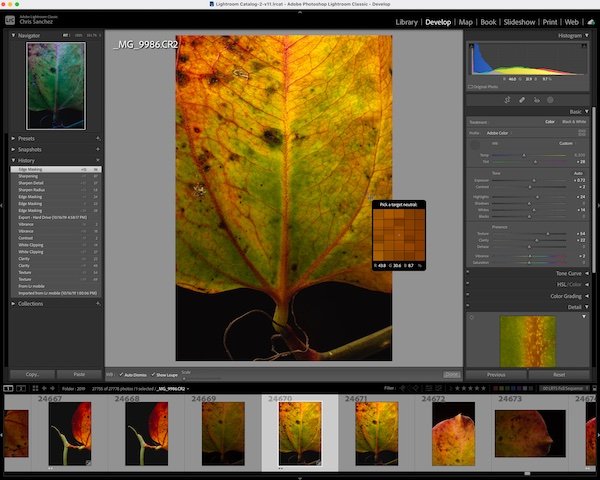
Lightroom Classic II is a continuation of our introductory course: “Lightroom Classic I”. In this class students will go beyond the basics and discover the advanced features Lightroom Classic has to offer.
Diving deeper into Lightroom Classic you’ll not only learn advanced editing tools and features, but also how to approach the thought process of image-editing. By introducing the method of editing students will learn how and when to use specific tools in Lightroom and create better photos immediately.
Recommended:
What You’ll Learn
LRC advanced editing tools (HSL, Spot Removal, Ai Masking)
A practical approach to editing any photo
Sharpening and noise reduction techniques
~Please Note: the content of this workshop is based on Adobe Lightroom Classic (not the mobile-based “Lightroom”).
What to bring:
Laptop computer and charger.
Notepad and pen/pencil.
Download a free 7-day Lightroom Classic Trial before class.
Note: most tablets cannot run the proper Lightroom Classic program and therefore are not recommended for class.
Do you need a laptop? We offer rentals here.

Lightroom Classic II
Explore powerful new tools, and discover timesaving tips and tricks.
Lightroom Classic II is a continuation of our introductory course: “Lightroom Classic I”. In this class students will go beyond the basics and discover the advanced features Lightroom Classic has to offer.
Diving deeper into Lightroom Classic we’ll learn how about advanced editing tools, discover new masking features, and much more. An additional theme of the class will be, how to approach editing, and where to start when editing your pictures..
By the end of this extended workshop, you’ll feel more confident within Lightroom Classic and all that the program offers.
Suggested Prerequisites:
Topics Covered:
A brief review of LRC basic editing tools
Masking and Ai features
Sharpening and noise reduction techniques
Individual goals during 1:1 time
~Please Note: the content of this workshop is based on Adobe Lightroom Classic (not the mobile-based “Lightroom”).
What to bring:
Laptop computer and charger.
Notepad and pen/pencil.
Download a free 7-day Lightroom Classic Trial before class.
Note: most tablets cannot run the proper Lightroom Classic program and therefore are not recommended for class.
Do you need a laptop? We offer rentals here.
Level: Beginner / Intermediate
Duration: 2.5-3.0 hours
Location: South Boston Studio
Class size limit: 7
Cancelation Policy: Running these small group workshops means attendance is important and cancelations impact our studio. Please review our transfers and cancellation policies, to learn more.
Related Workshops

Online: Organizing Your Photos

Lightroom Classic 1

Online: Composition Basics

Photo Projects for Beginners